

You built a SaaS product that people were excited to sign up for. After a few weeks, some use it regularly. But still a majority of them are not, and you aren’t able to figure out the exact root cause behind it.
That is exactly the problem a SaaS UX audit solves.
Research shows that 75% of SaaS users abandon products within the first week. Something in the experience gets in the way before they reach the part that makes the product worth paying for. A confusing onboarding flow. A workflow that asks for information users do not have on hand. An AI feature that produces results nobody trusts enough to act on.
A SaaS UX audit traces those problems back to their source, using real user behavior and structured evaluation rather than internal guesswork.
In this guide, you will learn what a SaaS UX audit involves, when you should run it, the complete UX audit process, and how to turn the findings into an action plan your team can actually use. Let’s get started.
What is a SaaS UX Audit?
A SaaS UX audit is a structured, expert-led evaluation of your product’s user experience. It looks at every part of the product that determines whether a user successfully gets value from it: onboarding, navigation, core workflows, feature discoverability, conversion paths, and accessibility. For products with AI features built in, it also covers trust design, output clarity, and explainability.
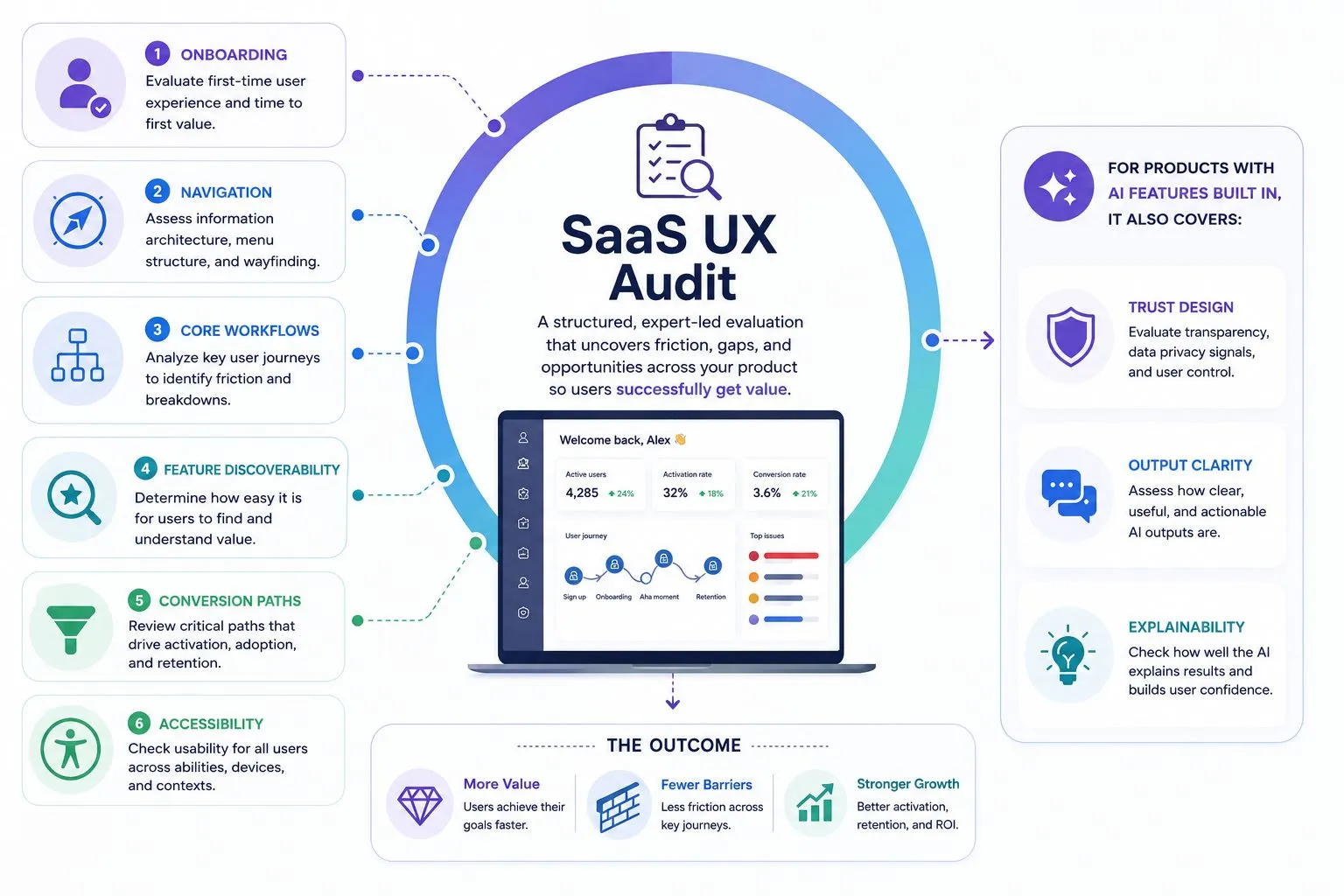
The process combines heuristic review (evaluating the product against established usability principles), behavioral data analysis (session recordings, heatmaps, funnel analytics), and user journey mapping.
For example, it would explain that new users are missing the primary setup action because it competes with too many secondary widgets. That delay affects time-to-value, activation, and trial conversion.
The final deliverable is a prioritized list of UX issues tied to specific business outcomes.
How is a SaaS UX Audit Different From a Website UX Audit?
A website UX audit usually evaluates a single-visit experience. A visitor lands on a page, scans the content, compares the offer, and either converts or leaves. The focus is often navigation, content clarity, page structure, forms, and lead conversion.
SaaS is fundamentally different. Here, the users use the product often on daily or weekly basis. They complete tasks, collaborate with other users, build habits, manage data, and expect the product to support more advanced use cases over time.
That changes the audit lens.
A UX audit for a SaaS product does not only ask whether the first impression is clear. It asks whether a new user can reach value quickly, whether recurring workflows remain efficient, whether important features are easy to discover, and whether the product continues to make sense as usage becomes more advanced.
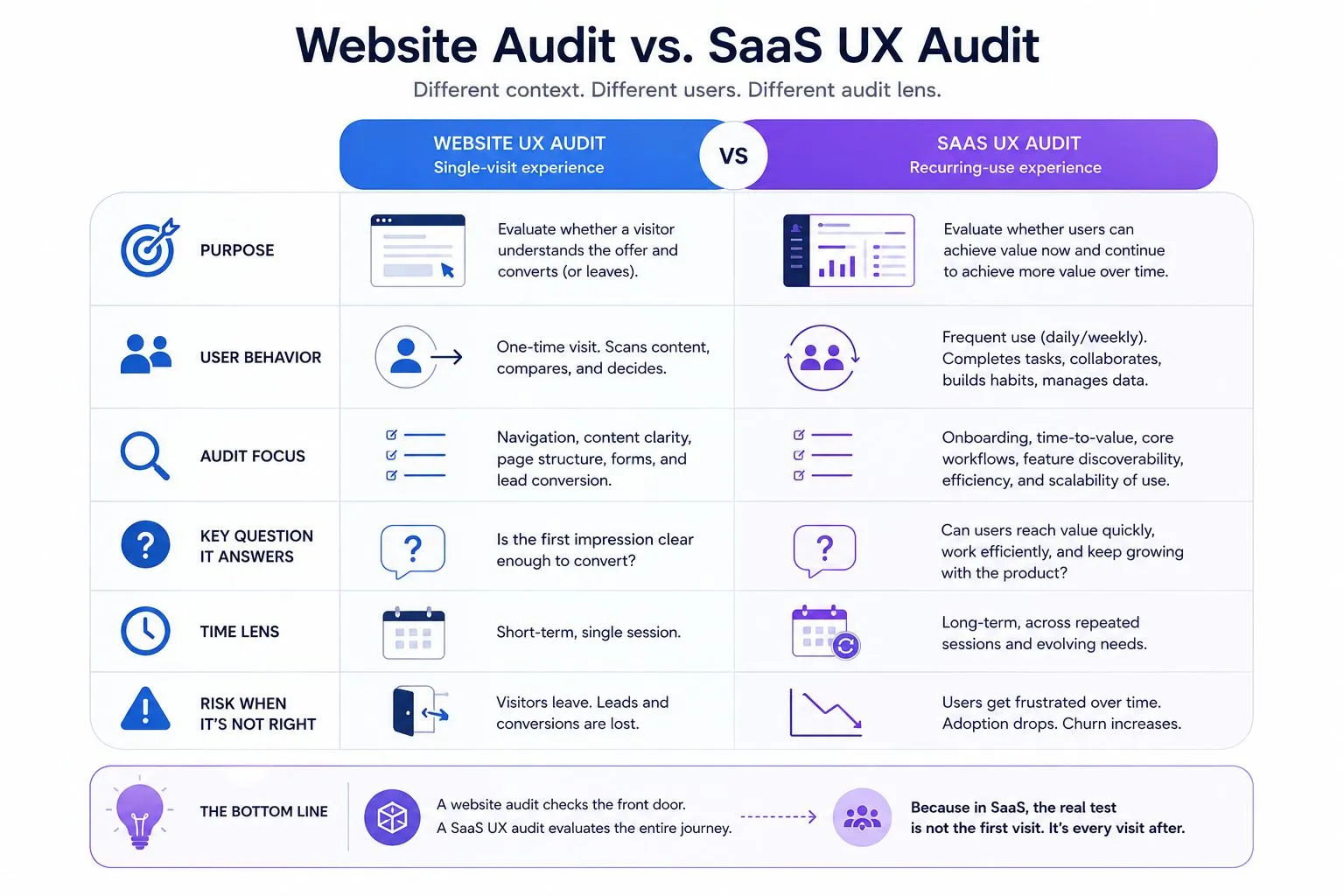
This recurring-use context makes SaaS UX more complex. A flow that feels acceptable once may become frustrating when repeated every week. A navigation label that seems minor during onboarding may become a daily source of confusion for an admin user. A feature that looks impressive in a demo may fail in real use because users cannot understand how it fits into their workflow.
That is why a SaaS UX audit evaluates the full product experience, not just the interface.
When should you run a SaaS UX audit?
Run a SaaS UX audit when your product shows friction in the places that directly affect growth: activation, conversion, retention, support, or feature adoption. The goal is to understand where users lose momentum and what needs to change before the issue becomes harder to fix.
It is especially useful before a major redesign because it gives the team a factual base. Instead of redesigning the most visible screens, you can identify which flows create the most friction and which parts of the product should stay stable.
A SaaS UX audit is worth running when:
- Users sign up but fail to reach the first meaningful outcome.
- Trial users do not convert because setup, empty states, or upgrade prompts create confusion.
- Existing users log in less often, skip key features, or rely on support for routine tasks.
- AI features get initial curiosity but low repeat usage because users lack clarity, trust, or control.
- Support tickets repeat the same questions, pointing to unclear navigation, missing context, weak error states, or poor data communication.
What should a SaaS UX audit cover?
A good SaaS UX audit focuses on the parts of the product that directly affect user success. The exact scope depends on the product, but most audits should review onboarding, navigation, workflows, feature adoption, conversion paths, accessibility, and AI UX where relevant.
Onboarding and time-to-value
The audit checks how quickly a new user can move from signup to a useful outcome. It reviews setup steps, empty states, product tours, default settings, and whether different user types need different onboarding paths.
Navigation and dashboard clarity
As SaaS products grow, navigation often becomes harder to follow. The audit reviews menu structure, labels, hierarchy, dashboard layout, role-based views, and access to frequently used actions.
Core workflows
The audit maps the workflows that create the most product value, such as creating a report, launching a campaign, inviting a teammate, or setting up an integration.
Feature discovery and adoption
It checks whether important features are surfaced at the right moment, explained clearly, and connected to real user needs.
Conversion, accessibility, and AI UX
The audit also reviews upgrade paths, paywalls, accessibility, UI consistency, and AI trust factors such as output clarity, explainability, user control, and fallback states.
How to conduct a SaaS UX audit
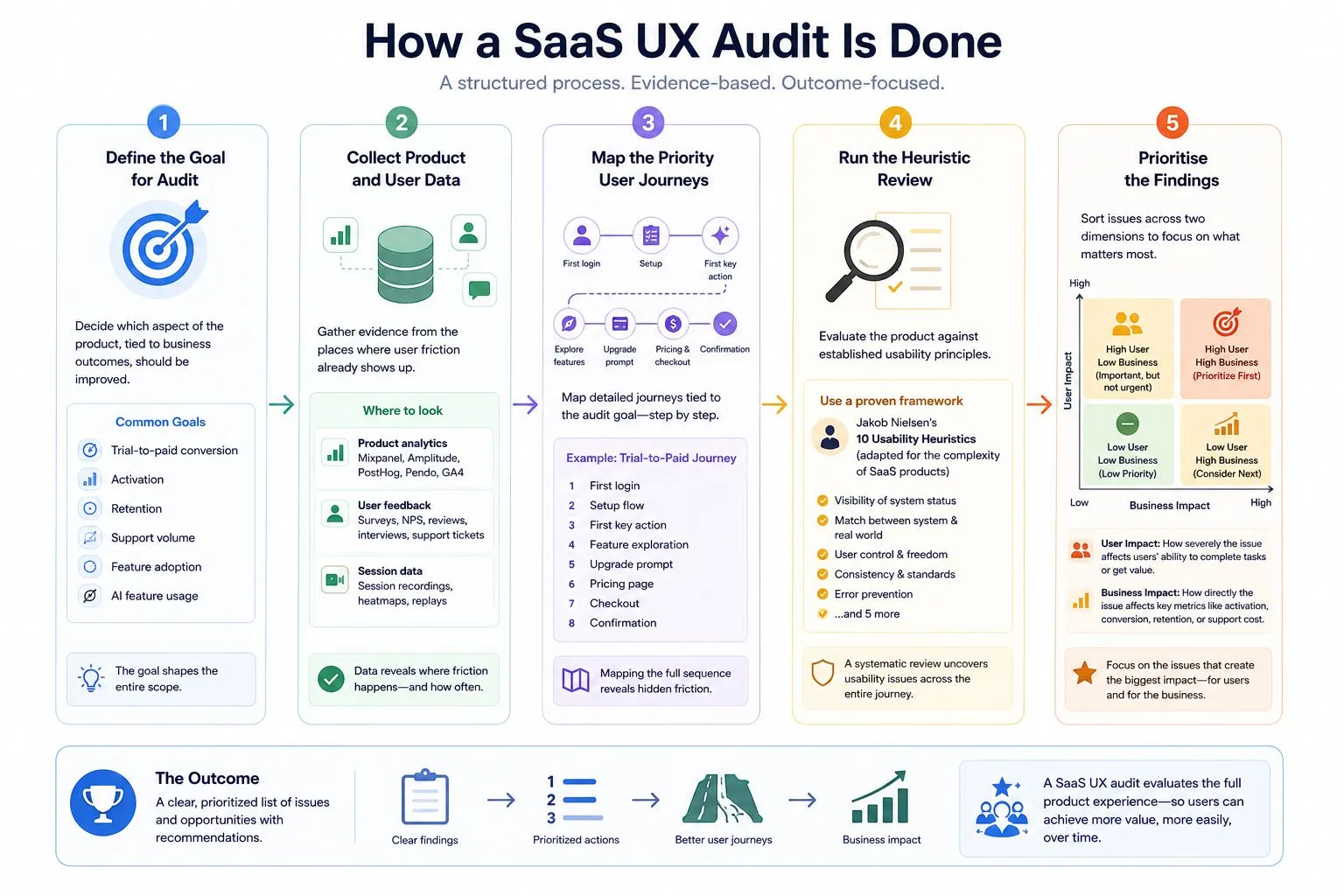
The UX audit process for SaaS follows a clear sequence of 5 key steps. Each step builds on the one before it, and skipping any of them tends to show up in the quality of the final report.
Step 1: Define the Goal for Audit
Start by deciding which aspect of the product, which is tied to business, should be improved. This could be trial-to-paid conversion, activation, retention, support volume, feature adoption, or AI feature usage. The goal shapes the entire scope.
For example, if trial users are not converting, the audit should focus on the path from signup to the first value moment and then to the upgrade decision. If an AI feature is underused, the audit should focus on prompt clarity, output trust, editability, and how the feature fits into the user’s existing workflow.
Step 2: Collect Product and User Data
Once the goal is clear, gather evidence from the places where user friction already shows up. Here you can use data from:
- Product analytics: Mixpanel, Amplitude, PostHog, Pendo, or GA4 to find drop-offs and feature usage gaps.
- Session recordings: Hotjar, FullStory, Clarity, or LogRocket to see how users move through key flows.
- Support data: Intercom, Zendesk, or Freshdesk to identify repeated questions and complaints.
- Customer inputs: Sales calls, customer success notes, churn reasons, NPS responses, and user interviews to understand expectations and friction.
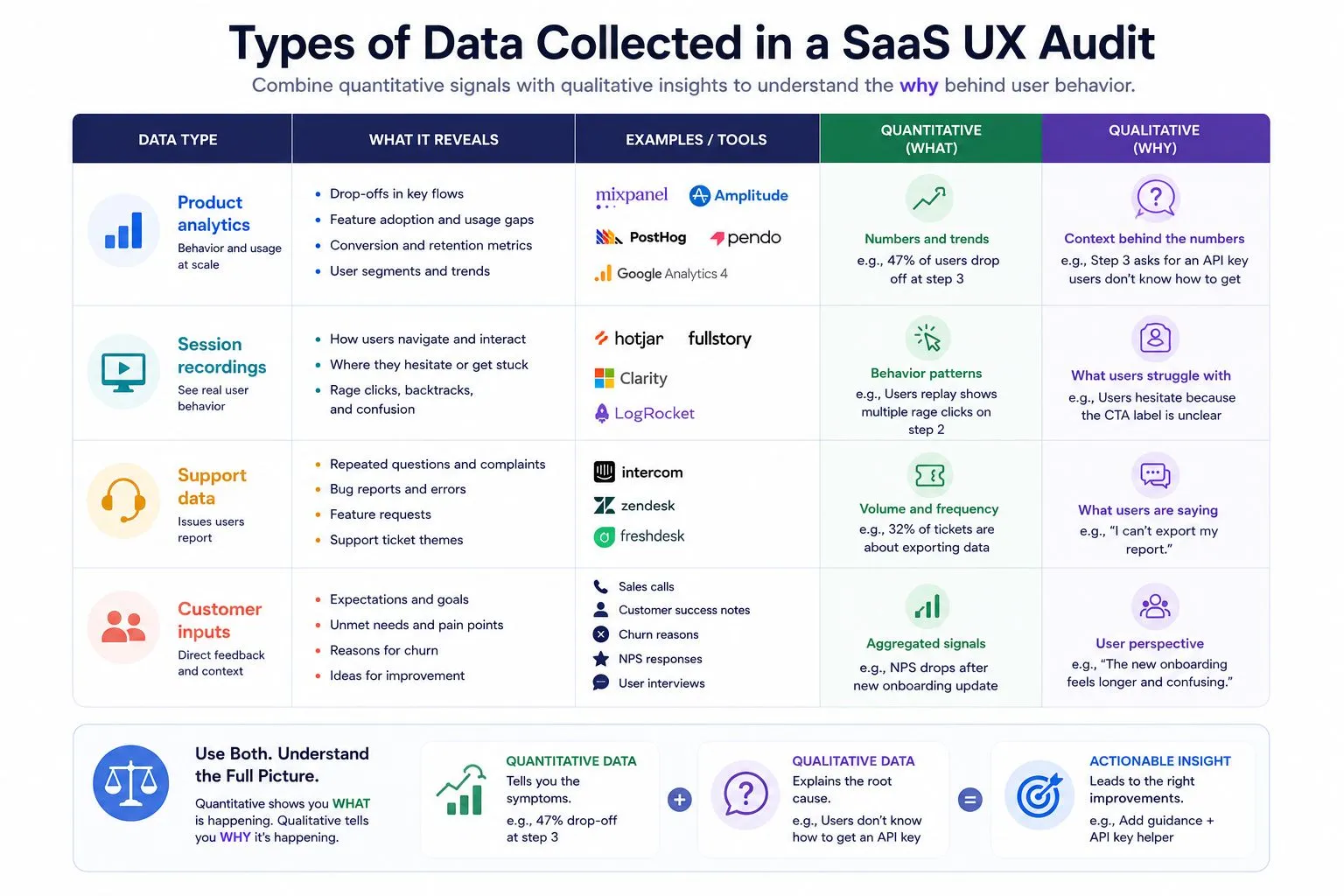
The distinction between quantitative and qualitative data is really important. Analytics tells you that 47% of users drop off at step 3 of the onboarding flow. But user interviews will give you the proper context that step 3 requires an API key that most users do not know how to generate. You need both types of data to understand the problem fully.
Step 3: Map the Priority User Journeys
Next, map the journeys tied to the audit goal. This should be a detailed flow, not a broad lifecycle diagram.
For a trial-to-paid audit, the journey may include the first login, setup flow, first key action, feature exploration, upgrade prompt, pricing page, checkout, and confirmation. Mapping the full sequence helps reveal friction that individual screen reviews often miss.
Step 4: Run the Heuristic Review
After you map the user journey, evaluate the product against established usability principles. The heuristic review is the systematic evaluation of the product against established usability principles. Jakob Nielsen’s 10 usability heuristics are the most widely used framework, and they hold up well for SaaS products when adapted for complexity.
In practice, this means evaluating the following aspects:
- Does the product keep users informed about what is happening? A long-running process with no progress indicator is one of the most common failures here.
- Can users easily undo actions or step back in a flow without losing their work?
- Are error messages written in plain language that explains what went wrong and how to fix it?
- Is the product consistent in how it labels and structures interactions across different areas?
For AI features, add a separate review for explainability, uncertainty, output review, correction flows, user control, and fallback states.
Step 5: Prioritise the findings
A thorough audit of a mid-size SaaS product can surface hundreds of individual issues. Without prioritization, that list is unusable.
Sort issues across two dimensions:
User impact: It measures how significantly an issue affects a user’s ability to complete a task or get value from the product. A broken export function that blocks users from retrieving their own data scores high. A misaligned icon in the settings menu scores low.
Business impact: It measures how directly an issue affects a metric you care about: activation rate, trial-to-paid conversion, retention, or support cost. An onboarding step that causes 40% of trial users to abandon before reaching their first value moment scores high on business impact. A tooltip with outdated copy scores low.
After scoring, group issues into four categories:
- Critical blockers (fix immediately)
- High-impact issues (address in the next sprint cycle)
- Medium-term improvements (schedule for next quarter) and
- Low-priority polish (add to the backlog)
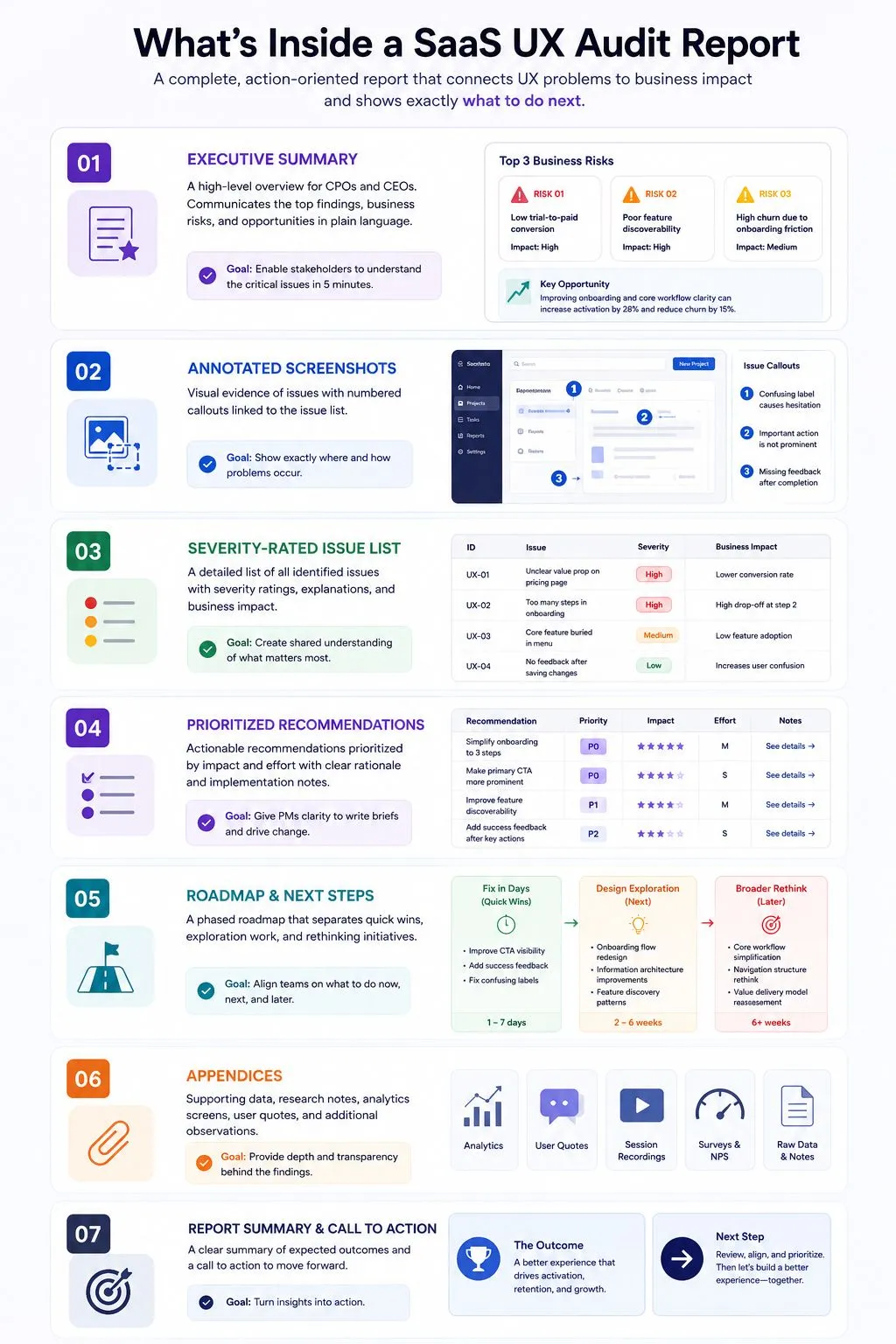
Your final SaaS UX audit report should include:
- An executive summary that a CPO or CEO can read in five minutes and walk away understanding the top three business risks.
- Annotated screenshots with specific, numbered callouts tied to the issue list.
- A severity-rated issue list with clear explanations of each problem and its business impact.
- Prioritized recommendations with enough detail for a product manager to write a brief from.
- A roadmap that distinguishes between what can be fixed in days, what needs design exploration, and what needs a broader rethink.
How Kreeya Can Help
Kreeya helps SaaS teams identify the product friction that affects key user satisfaction metrics and their impact on business. Our SaaS UX audit combines UX strategy, product thinking, interface review, and alignment with business goals. We review the user flows that matter most to your users and your business, then turn the findings into a prioritized improvement roadmap.
For AI-powered SaaS products, we also review prompt design, output experience, trust signals, explainability, fallback states, and user control. These areas are now central to product usability, not optional additions.
Hire Kreeya for an in-depth SaaS UX audit of your product.
